An independent jevbooks guide · Updated
Jev 1.14 was released on October 14, 2026, with quality improvements including multilingual tasks. Images are available on both 1.13 and 1.14; Box requires 1.14. Images and Box are experimental, with formats, limits, and accuracy subject to change.
Test status (October 22, 2026): our first text-only probe returned HTTP 451 because the official API was unavailable in our region, so we did not proceed to image calls. The example below has a checked request structure, but no successful image response, latency, or accuracy result. Known positions in the fixture are not model outputs.
1. Pin the model and record the served version
This example explicitly uses jev-1.14.0. The model documentation retrieved on October 22 still mapped jev-latest to 1.13 and jev-preview to 1.14. Aliases can change; release dates do not establish their current targets. Save the response model, questions, input, and usage for meaningful comparisons.
Our older p50 of about 375 ms and Top 10 overlap of 5/10 come from September 2026 tests on 1.13. They are not 1.14 results, and the announced multilingual improvement does not establish parity between Chinese and English.
2. Download the PNG and request; identify the target
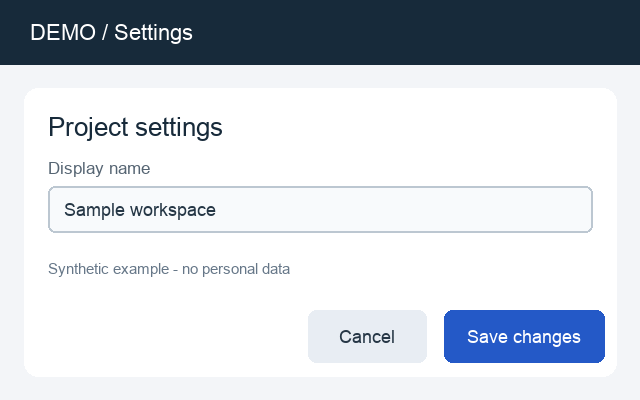
Save the files together. The Node script requires Node 22+ with no package install; the Python script requires requests. Set the TYPESAFE_API_KEY environment variable, then run node request.mjs or python3 request.py. Both scripts read the same request.json and save a successful response to response.json.
Before using Python, install the request dependency in your Python environment:
python3 -m pip install requests
3. Send the image as an asset
The request puts a unique image reference in state.screenshot. The assets map connects it to the upload part screenshot-file. Four questions share the screenshot by field path, avoiding repeated image references in each question.
{
  "model": "jev-1.14.0",
  "state": {
    "screenshot": "739c0c20-5636-4ed4-856c-a44ee83f5d20"
  },
  "assets": {
    "739c0c20-5636-4ed4-856c-a44ee83f5d20": {
      "type": "image",
      "part": "screenshot-file"
    }
  },
  "questions": {
    "save_visible": {
      "type": "noul",
      "instructions": "Is a button labeled Save changes visible in `screenshot`?"
    },
    "save_button": {
      "type": "box",
      "instructions": "The entire button labeled Save changes in `screenshot`, including its colored background."
    },
    "delete_visible": {
      "type": "noul",
      "instructions": "Is a button labeled Delete account visible in `screenshot`?"
    },
    "delete_button": {
      "type": "box",
      "instructions": "The entire button labeled Delete account in `screenshot`."
    }
  }
}
You can also use curl. The request part must come first in multipart. Let curl set Content-Type and its boundary. Every request containing an image or Box question needs the experimental header.
curl --fail-with-body https://api.typesafe.ai/v1/systemone \
  -H "Authorization: Bearer $TYPESAFE_API_KEY" \
  -H "TypeSafe-Danger-Zone-Images: true" \
  -F 'request=@request.json;type=application/json' \
  -F 'screenshot-file=@settings-demo.png;type=image/png' \
  -o response.json
For JSON-only clients, use an asset shaped as {"type":"image","format":"png","data_base64":"…"}, without a data: prefix. Putting base64 in state alone does not attach an image. References match plain strings, so use UUIDs to avoid accidental matches; every asset must be referenced.
The official SDKs can create references and upload images: JavaScript @typesafe-ai/sdk 0.7.0 (Node ≥22) and Python typesafe-sdk 0.7.5. Their default compression may need adjustment for third-party gateways. This example calls the official API directly.
4. Check presence before using Box coordinates
Noul and Box answer in the same batch. Box has no not-found result: it returns four edges even when Delete account is absent. Your application must check delete_visible.noul before accepting delete_button.box. Box confidence is neither object-presence probability nor IoU.
All four edges are relative coordinates from 0 to 1: multiply left/right by image width and top/bottom by image height, with the origin at the top left. The code below crops only after presence and localization pass illustrative thresholds. Calibrate them on your own samples.
The crop code uses Pillow (imported as PIL). Install it first:
python3 -m pip install Pillow
import json
from PIL import Image

response = json.load(open("response.json"))
answers = response["answers"]
visible = answers["save_visible"]["noul"]
answer = answers["save_button"]

# Example thresholds only: calibrate them on your own images.
if visible < 0.8:
    print("No reliable presence signal; ignore the box.")
elif answer["confidence"] < 0.6:
    print("Review or retry on a better crop before using the box.")
else:
    img = Image.open("settings-demo.png")
    width, height = img.size
    b = answer["box"]
    clamp = lambda value: max(0, min(1, value))
    pixels = (
        round(clamp(b["left"]) * width),
        round(clamp(b["top"]) * height),
        round(clamp(b["right"]) * width),
        round(clamp(b["bottom"]) * height),
    )
    if pixels[0] >= pixels[2] or pixels[1] >= pixels[3]:
        raise ValueError("Invalid pixel box after rounding")
    img.crop(pixels).save("save-button.png")

print("served model:", response["model"])
print("input tokens:", response["usage"]["input_tokens"])
Each Box question finds one target. Use separate questions for distinct targets, or classify none / one / several before searching regions. For small targets, locate a region and ask again with a clearer crop. Low confidence can trigger review or a padded crop. Any crop sent back to the API must still be at least 280 px on each side.
Related pattern: multiple questions on one state · Independent verification
5. Image, context, and cost limits
| Item | Current rule |
|---|---|
| File | Static PNG / JPEG only; ≤16 MiB per file, 280–1568 px per side. |
| Preparation | Resize or pad, and rotate the pixels upright yourself. The API neither resizes nor applies EXIF orientation. Extract still frames from video. |
| Size limits | The request body, processed images combined, and expanded request each have a 32 MiB limit. Repeated references count again in the expanded request. |
| Default context | state + all questions ≤64k tokens; state + any one question ≤32k. Image tokens count too. |
| Experimental long context | TypeSafe-Danger-Zone-Long-Context: true — raises both limits to 262k on 1.13 / 1.14. Official docs warn of slower responses and reduced accuracy. This does not replace the image header. |
| Price | $0.042 per million input tokens; output is free. Image and text tokens share the rate; usage.input_tokens includes images. |
Input cost for a successful request is usage.input_tokens ÷ 1,000,000 × $0.042. The official docs do not yet provide an image-token estimator, so there is no fixed per-image cost here. Long context does not lift the 32 MiB size limits. Narrow the state or split the work before increasing context.
Next steps and primary sources
- Jev 1.14 release announcement · Models, pricing, and context
- Images: assets, uploads, and limits · Box: coordinates and absent targets
- Start with signup and a first text request · Build ticket routing in n8n
- WorkflowEvals · System One Adapter — Official evaluation resources. Agreement with reference models is not accuracy against human ground truth; pin dataset and model versions when reproducing results.